
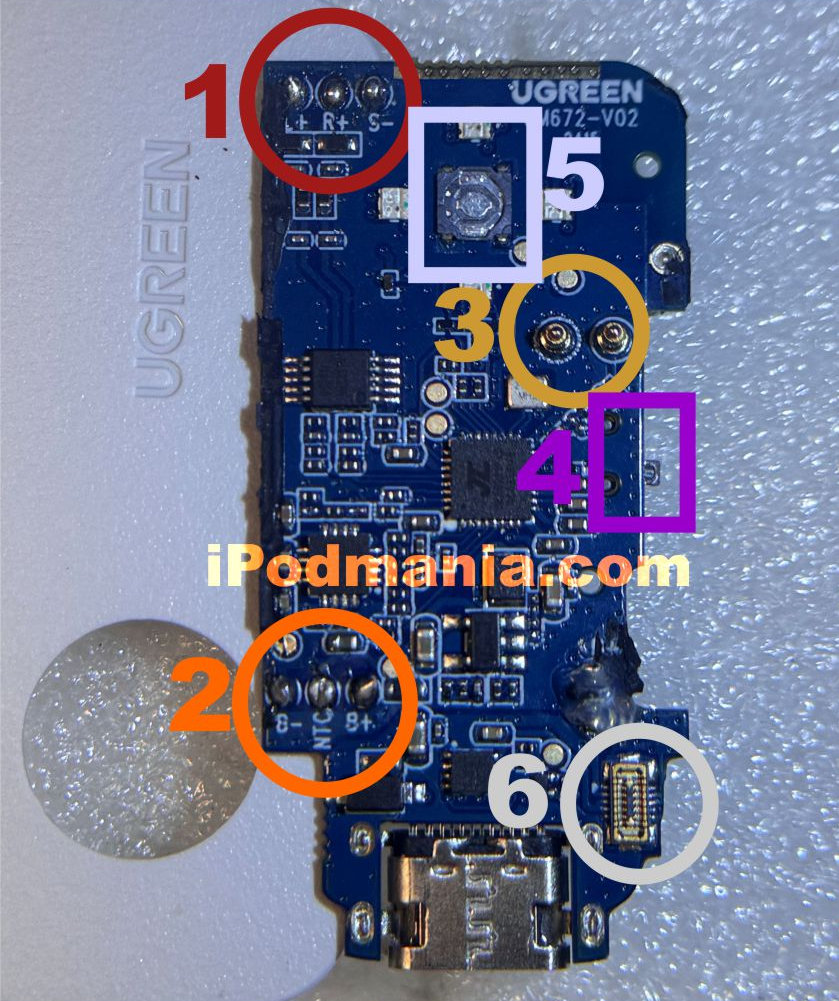
| Labels | Where to Connect | Comments |
|---|---|---|
| 1. L+, R+ and S- | Headphone jack, left to L+, right to R+, & common to S- | Left or right terminals can be interchanged but not the common (S-) terminal to any of the polarities. |
| 2. B-, NTC, B+ | iPod battery, negative to B-, common to NTC (neutral/common), and positive to B+ | Make sure to follow polarity as it burns the circuit board if connections are interchanged. |
| 3. Antenna | UGreen antenna | Solder the antenna terminal to the strip-antenna that came with UGreen. |
| 4. RX, TX Switch | No connection | Make sure to position the switch to TR mode. |
| 5. Connect Button | Connect button terminals to a tactile button switch | Solder a 2-core wire from the connect button terminals to a tactile button switch. You can make use of the iPod hold button to trigger this tactile switch. Remove the small screw from the hold switch and mount the tactile switch under it. |
| 6. UGreen Amplifier | UGreen amplifier | Make sure the UGreen amp is connected to improve connectivity. |